
Safelop

Your documents.
Organized. Shared. Secure.

Create vaults to organize and share important documents with your partner or team. All data stays in your iCloud.
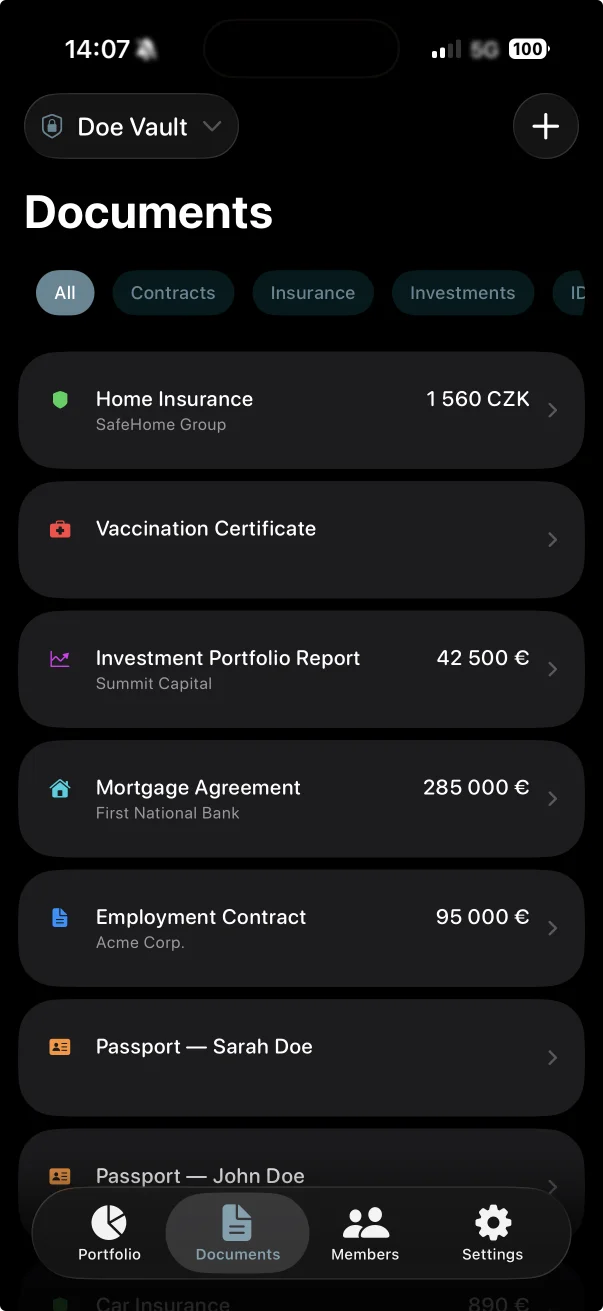
Safelop app screenshot showing document management
Download on the App Store

Features

Everything you need to
keep your life organized.

From contracts and insurance to financial assets and emergency plans.

Document Management

7 categories, metadata, expiration tracking, and file attachments.

iCloud Sharing

Invite vault members instantly. Everyone stays in sync.

Apple Intelligence

On-device OCR auto-fill, AI summaries, and smart search.

Portfolio Tracking

Charts, history, multi-currency support.

Emergency Plans

Time-locked instructions with configurable delays.

Private by Default

Zero servers. Face ID. Your iCloud only.

How It Works

Up and running in minutes.

1

Sign In

Sign in with Apple.

2

Create Vault

Name it anything.

3

Invite

Share via iCloud.

4

Add Docs

AI fills the details.

5

In Sync

Across all devices.

Privacy Policy

Your data is yours. Period.

Your documents never leave your control.

Overview

All data is stored exclusively in your personal Apple iCloud account. We operate no backend servers and collect no user data. We cannot see, access, or analyze anything you store.

Sign in with Apple

We receive a unique identifier and, optionally, your name. Stored locally and synced via iCloud. Never sent to any external server.

Camera & Photo Library

Used solely for document attachments. Files are stored in your iCloud account and never uploaded externally.

Apple Intelligence

OCR, summaries, and search are powered by on-device Foundation Models. All processing is local. No data sent to external AI servers.

iCloud Sharing

Managed entirely by Apple's CloudKit. We have no visibility into shared data, participants, or activity.

Data Deletion

Delete any data at any time in the app or via iCloud settings. Permanently removed once deleted.

Children's Privacy

Not directed at children under 13. We do not knowingly collect information from children.

Policy Changes

Any changes will be posted on this page.

Support

Need help?

We typically respond within 24 hours.

use@safelop.app

Frequently Asked Questions

Got questions? We have answers.

All your data is stored exclusively in your personal Apple iCloud account. Safelop does not operate any backend servers, databases, or cloud infrastructure. We literally cannot see, access, or analyze anything you store in the app. Your documents, attachments, portfolio data, and vault settings never leave Apple's ecosystem.
Open your vault, go to the Members tab, and tap the Invite button. Safelop uses Apple's native iCloud sharing to send an invitation. The other person needs to have an iCloud account and accept the invitation. Once they join, they'll see all documents and assets in the shared vault, and any changes either of you make will sync automatically.
Your data remains safely in your iCloud account even after you delete Safelop from your device. When you reinstall the app, all your vaults, documents, portfolio assets, and emergency plans will sync back automatically. You can also manage your iCloud storage and data through your device's Settings app.
Safelop works fully offline. You can browse, edit, and add documents without an internet connection. All your changes are saved locally and will sync automatically with iCloud as soon as you're back online. This means you always have access to your important documents, even when traveling or without service.
Apple Intelligence is Apple's on-device AI, available on iPhone 16 and later models. In Safelop, it powers three optional features: smart OCR that automatically reads your document photos and fills in details like title, counterparty, and amounts; AI-generated summaries that give you a quick overview of each document; and intelligent full-text search across all your content. These features are completely optional. The app is fully functional without them on older devices.
Emergency Plans let you leave important instructions for your vault members that are normally locked and hidden. When a vault member requests access to a plan, a configurable waiting period begins — 48 hours, 7 days, or 30 days. During this window, you can cancel the request if it was made by mistake. If the timer runs out without cancellation, the plan unlocks automatically. You can also link relevant documents and add emergency contacts with phone numbers and roles. It's designed for situations where someone needs access to critical information if something happens to you.
Refunds for App Store purchases are handled directly by Apple. You can request a refund by visiting reportaproblem.apple.com, signing in with your Apple ID, finding the Safelop purchase, and submitting a refund request. Apple typically processes refund requests within a few days.